

From an AI mockup to a working Godot game UI
An AI mockup is a visual starting point, not a working Godot interface. Separate its artwork from text and controls, define the screen behavior, then build and test a UI document that the game can load.
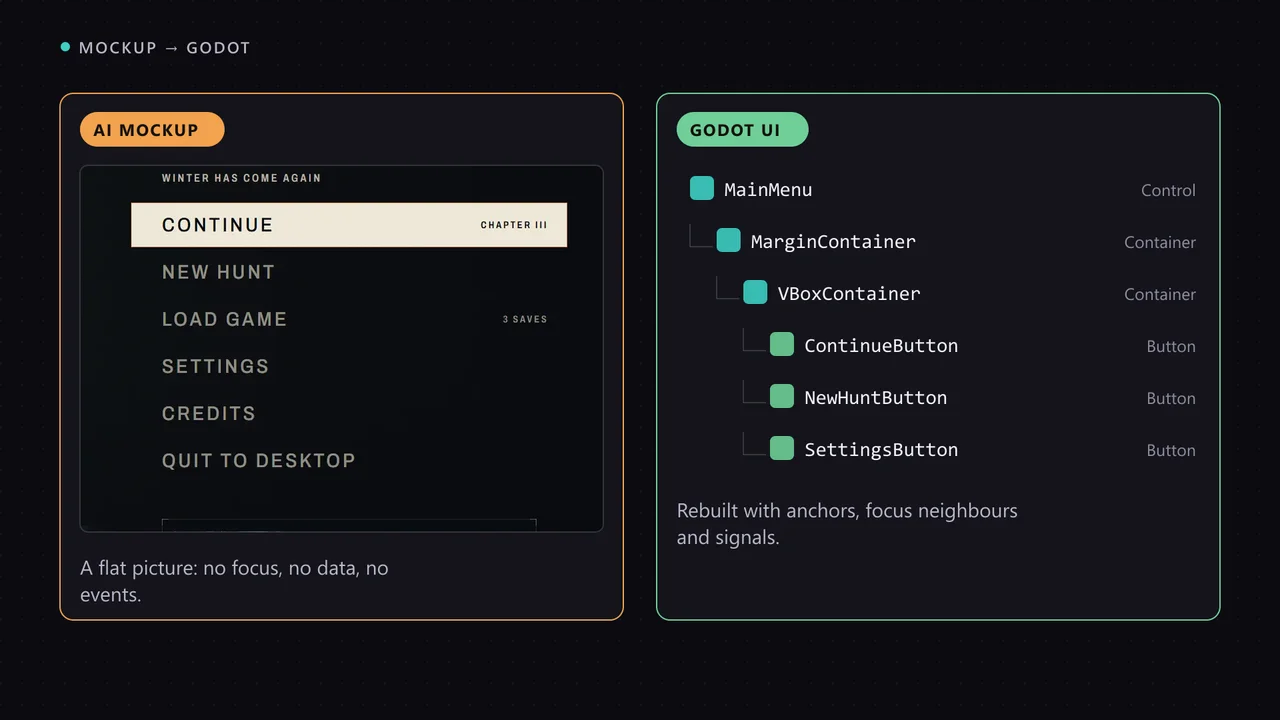
A generated picture can help establish a visual direction, but it has no dependable knowledge of your game state. A button painted into an image has no focus behavior or event. A health bar in a mockup does not know the player’s current health.
The practical job is to turn the picture into a set of editable pieces and explicit behaviors.
Sort the reference into parts
List each element as artwork, text, layout, input or dynamic data. A main menu might contain a background illustration, a logo, three buttons and a version label. Decide which assets you have the right to use and which text must be replaceable or translatable.
For each control, record its normal, focused, pressed and disabled states. A mockup that shows only the normal state leaves the rest to be designed. Also decide what the button does when the operation fails or the player presses it twice.
Rebuild the screen as a UI
Use the image as a guide to spacing, hierarchy and color. Draw frames and controls as actual layers, then add text and interactive states. Set anchors or layout rules for the target resolutions rather than copying coordinates from one screenshot.
Envy can import an SVG as layers. The import leaves out SVG text and images; add those separately. A raster image can be used as artwork, but it does not become editable controls merely by importing it. Verify that the image is legible and sized appropriately on the devices you support.
Add data and actions
Create an event for each game-owned action. For a button that starts a game, the UI might emit new_game_requested; the game’s controller decides what that action means. If the screen displays a player name, bind it to a path supplied by the game and test a long name.
Envy can prototype screen navigation and emit an event as separate actions. It also exports an event and data contract in its AI handoff package. Those names are the boundary for the agent that connects the document to your project. Visual edits can stay independent of game code while the contract stays compatible.
Hand off to a coding agent
Give the agent the UI document, contract.json, target engine, project instructions and reference images. Ask it to load the document with the Godot runtime, set real data and connect every required event. Require it to report unhandled events and checks it could not run. Do not ask it to infer gameplay rules from the artwork.
Verify the result
Compare the screen with the reference at the same viewport. Then exercise the game: use a mouse and supported controller, test focus order, change the values and try long text. Check the smallest target resolution and your chosen safe area. A faithful picture can still contain a broken menu.
Read Envy for coding agents for the handoff flow, and see Figma to Godot and Unity for more on transferring visual designs into runtime UI.
Questions people ask
Can I import an AI-generated image as editable buttons?
A raster image does not contain reliable button, text or layout semantics. You need to recreate or supply those elements and define their behavior.
Does Envy import every part of an SVG as editable UI?
Envy imports supported SVG shapes as layers. Its SVG import leaves out text and images, which need to be added separately.
What must be tested after turning a mockup into game UI?
Test layout at target resolutions, real data, button behavior, keyboard or controller focus, text fit and rendering in the game engine.