

Game UI design software in 2026: what each tool is for
Game UI tools fall into four groups: mockup tools (Figma, Photoshop, Affinity) that produce pictures, engine editors (Godot's Control editor, Unity UI Builder and uGUI, Unreal UMG) that produce the real UI for one engine, runtime middleware (Noesis, Gameface, Rive) that runs UI made in another format inside the engine, and editors like Envy whose design file is the runtime UI. Pick by what you need at the end: a picture, or a screen that runs.
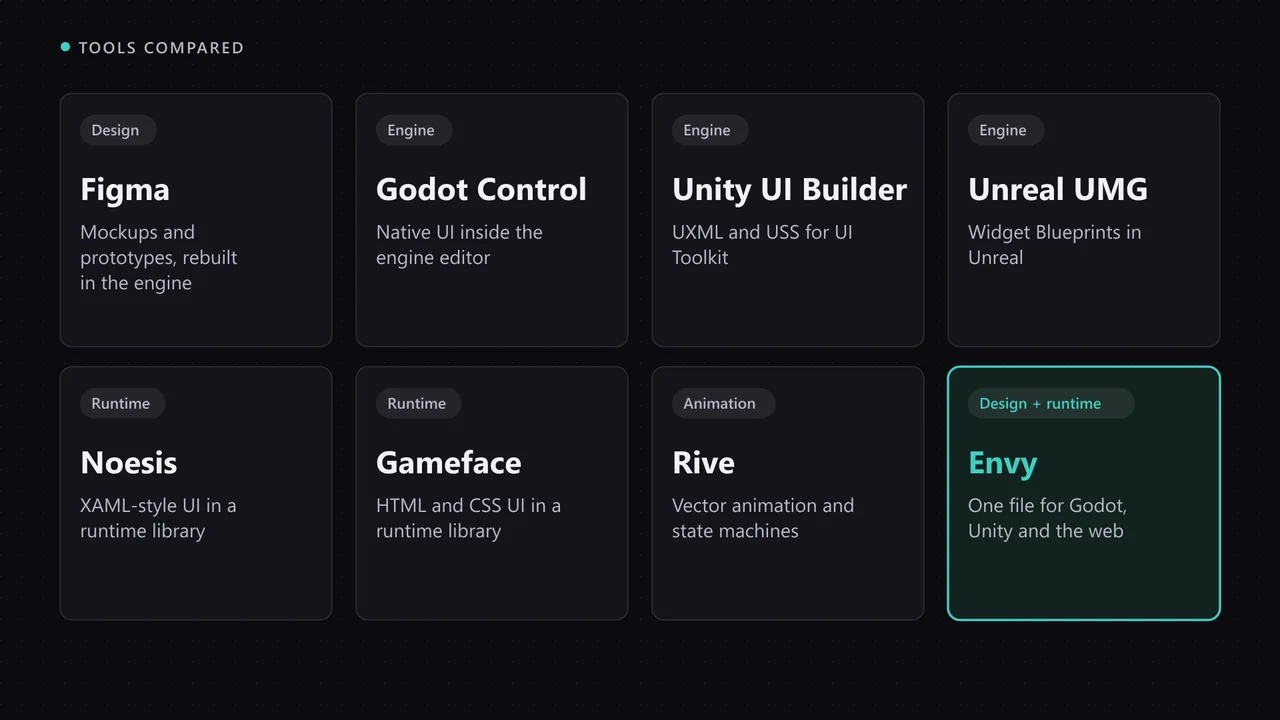
Search for “game UI design software” and you get lists that put Photoshop next to Unreal Engine as if they did the same job. They don’t. The useful question is what you have at the end of the day: a picture of a menu, or a menu that runs in your game. Everything else follows from that.
Here is how the tools people use in 2026 sort out.
1. Mockup and art tools
Figma, Photoshop, Affinity, Illustrator.
These are where most game UI starts. You explore layouts, set the visual style, draw icons and frames, and show flows to the team. Figma in particular is good at components, variants and quick click-through prototypes.
What you get at the end: images and a design file. The engine can’t read it. Someone rebuilds each screen in the engine, sets up anchors and containers, wires the button states and redoes the animations. That rebuild is where most of the cost of game UI sits, and it happens again every time the design changes. We wrote about why in Figma to Godot or Unity: why game UI handoff breaks.
Use them for art direction, icons, textures, early exploration and pitches.
2. The engine’s own UI editor
Godot’s Control nodes and Theme editor. Unity’s UI Builder (UI Toolkit) and the uGUI Canvas. Unreal’s UMG widget designer.
This is the UI that ships, bound to game data and taking input. Whoever knows the engine builds it, which is often a programmer, and it only works in that engine.
| Engine | Visual editor | Layout model |
|---|---|---|
| Godot 4 | 2D editor with Control nodes | Anchors, offsets, containers |
| Unity 6 | UI Builder (UI Toolkit) or the Scene view (uGUI) | Flexbox-like with USS, or RectTransform anchors |
| Unreal 5 | UMG Widget Blueprint designer | Canvas, horizontal and vertical boxes, slots |
In Unity, the choice between UI Toolkit and uGUI is its own decision. Unity’s current docs still recommend uGUI for runtime UI, with UI Toolkit as the alternative. We compare the two in Unity UI Toolkit vs uGUI.
Use them for the shipping UI when the person designing it is comfortable in the engine.
3. Runtime middleware
These run UI made in another format inside your engine, through a plugin.
- NoesisGUI uses XAML, the markup language from Microsoft’s WPF, with data binding and styles. It targets Unity, Unreal and custom engines.
- Coherent Gameface runs UI written in HTML, CSS and JavaScript inside the game, so web skills carry over.
- Rive makes interactive vector graphics with state machines, and has runtimes for the web, mobile and some game engines. It is strongest for animated pieces like buttons, meters and character portraits, and it pairs with layout tools rather than replacing them. Rive even documents a Rive and Noesis setup.
What you get at the end: UI that runs in the engine, written in a format a designer or web developer can own. The cost is another dependency, its license, and a learning curve. Check each vendor’s engine support and terms against your target platforms before you commit.
Use them for UI-heavy games on Unity, Unreal or custom engines, especially with a team that already knows XAML or the web.
4. Editors where the design file is the UI
This is the group Envy is in, so take this section with that in mind.
The idea: design on a canvas like Figma, but the file you save is what the game loads. In Envy you draw screens with anchors and auto layout, make components with variants and states, bind text and bars to data paths, add animations and screen transitions, and press Preview to click through with a mouse or a gamepad. The Godot runtime builds real Control nodes from the file, the Unity runtime builds UI Toolkit elements, and the web runtime draws it in a page. Game code listens for event names like play and sets data like player.hp, so a redesign doesn’t touch it.
What you get at the end: the shipping UI for Godot 4, Unity 6 and the web from one file, plus a handoff package for programmers or AI coding agents. What you don’t get: an Unreal runtime (not available), or Figma’s real-time collaboration. Envy is a paid desktop app for Windows, with Linux next.
It suits indie and small teams on Godot, Unity or web games who want the designer’s file to be the game’s UI.
How to choose
| If you need… | Look at |
|---|---|
| Mood boards, art direction, pitch screens | Figma, Photoshop, Affinity |
| A click-through prototype for playtests | Figma prototypes, or an editor with a working preview |
| The shipping UI, and your designer knows the engine | The engine’s own editor |
| Shipping UI on Unreal | UMG, or middleware such as Noesis or Gameface |
| Complex animated vector widgets | Rive |
| Shipping UI on Godot, Unity or the web from a visual editor | Envy |
| UI that an AI coding agent can wire into the game | A tool with a machine-readable contract. See game UI with AI coding agents |
Most teams end up with one tool for art and one for the screens that run. A screen designed in one and rebuilt in the other drifts a little with every change, so keep the number of rebuilt screens small.
Questions to ask any tool before you commit
- Does the file run in my engine, or is it a reference for someone to rebuild?
- How does it handle other screen sizes: 21:9, 16:10 on a Steam Deck, 4:3?
- Can a player use it with a gamepad, and can I set focus order?
- How do translations work, and what happens when German is 30% longer?
- Where do the button states (hover, pressed, focused, disabled) live?
- What does my programmer have to write to connect it to game data?
- What happens to my files if I stop paying, or the tool stops being updated?
On the last question: Envy’s runtimes and its document format are MIT licensed, so a shipped game keeps working with or without the editor. Ask the same of any tool you pick.
Questions people ask
What software do game UI designers use?
Most start in Figma or Photoshop for mockups and art, then the UI is rebuilt in the engine's own editor: Godot's Control nodes, Unity's UI Builder or Canvas, or Unreal's UMG. Larger studios sometimes add middleware such as Noesis or Gameface.
Is Figma good for game UI?
For mockups, flows and art direction, yes. Figma doesn't export a game screen that runs in an engine, so someone rebuilds the layout, states and animation by hand.
What is the best game UI design tool for Godot?
Godot's own editor builds the real UI with Control nodes and containers. If you want a visual design tool that outputs working Godot UI, Envy builds real Control nodes from its file, and the same file also runs in Unity and the browser.
Do I need a separate tool for game UI animation?
Not always. Godot has AnimationPlayer and tweens, Unity UI Toolkit has USS transitions, and Unreal has UMG animations. Rive is worth a look when you need complex vector animation driven by a state machine.