

How to write a game UI contract for an AI coding agent
A game UI contract names what the game sends to the interface, what the interface sends back and who owns each change. Give an AI agent those names, types, examples and acceptance checks alongside the actual design file. Then test the integration in the target game.
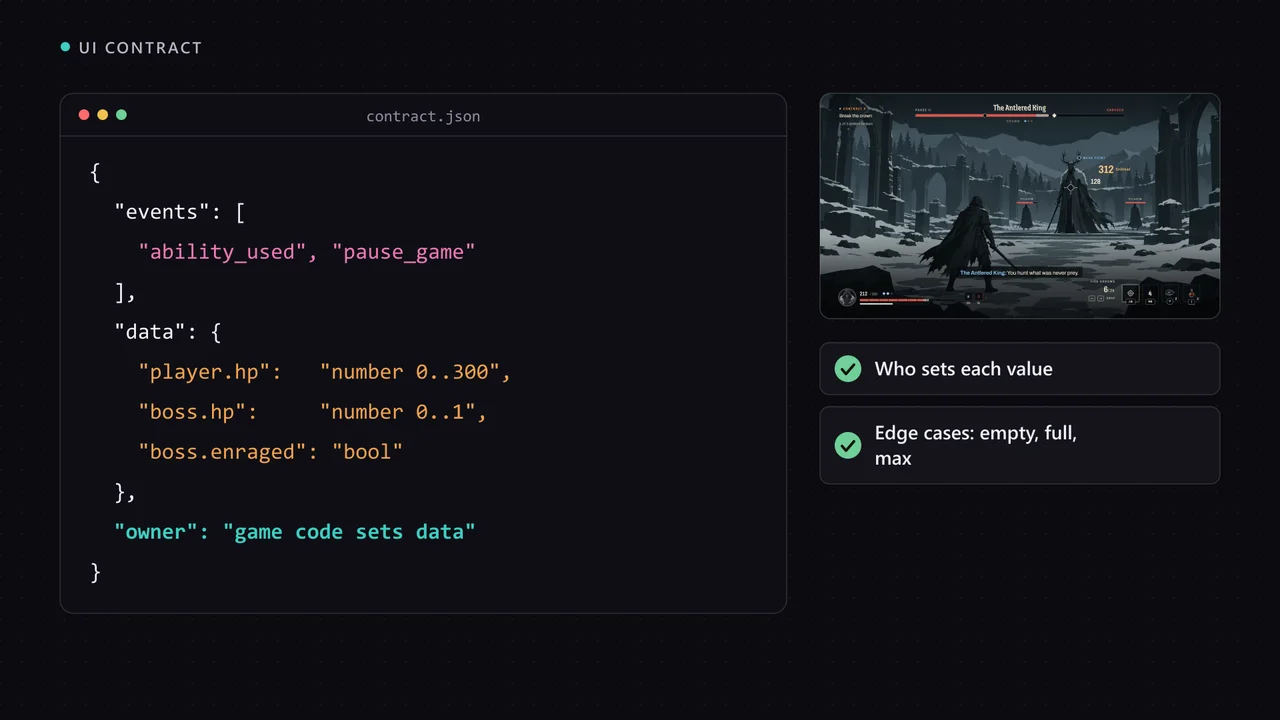
An AI agent can connect a health bar to player.hp in minutes and still build the wrong feature. Does hp mean current health or a percentage? Who calculates the maximum? What happens when the player has no active character? A contract answers those questions before the agent writes code.
The contract is useful even without AI. It gives the designer and programmer a shared boundary while allowing the visual layout and game implementation to change independently.
Start with a screen and a real interaction
Choose a small vertical slice. For a pause menu, that could be the pause overlay, a Resume button and the current audio volume. Draw the screen, then record what must cross the boundary:
| Direction | Name | Example | Owner |
|---|---|---|---|
| Game to UI | settings.master_volume |
Number from 0 to 1 | Game settings system |
| UI to game | resume_requested |
No payload | Pause controller handles it |
| UI to game | volume_changed |
New normalized number | Settings system validates and saves it |
These names are illustrative. Pick your own names and units, then use them consistently. A value of 75 in one part of the game and 0.75 in another is a predictable integration bug.
Specify more than a name
For each data path, record its type, unit, expected range, sample value, initial value, update timing and behavior when the value is absent. For an event, record what the user did, the payload shape, whether the action can repeat and what owns the result.
For example:
Data: player.hp
Type and unit: number, current hit points, not a percentage
Sample: 72; expected range: 0 to player.max_hp
Missing value: show a neutral placeholder until the game supplies it
Update: game sends a new value when health changes

Event: resume_requested
Payload: none
Handler: pause controller closes the overlay and resumes gameplay
Repeat: ignore an extra request while the transition is in progress
Avoid embedding a hidden product decision in the agent prompt. If health can exceed its usual maximum, say how the UI should represent that state. If a network request fails, specify the visible error and retry behavior. The person responsible for the game makes these decisions.
Keep game rules in the game
A UI can display currency and request a purchase. The game must still check the balance, ownership and transaction result. A disabled button is useful feedback, not an authorization check. The same principle applies to saving, matchmaking and deleting a save slot.
The agent’s task becomes: listen for purchase_requested, call the existing purchase system, and update the UI with the result. It should not invent a second economy inside the screen script. Similarly, decide whether the UI may write a setting directly or only emit a request that the game validates.
Give the agent evidence, not only instructions
An agent needs the actual UI document, an outline of screens, the contract and reference renders. Include the project rules and a clear task boundary. Here is a prompt you can adapt:
Integrate the pause UI into this game using the supplied UI document.
Read the contract and project instructions first. Handle every listed
pause event and supply the documented settings data. Keep game rules in
the existing settings and pause systems. Do not rebuild the layout.
Run the document validator and the relevant game tests. Report any
contract item you could not implement or verify.
Review the agent’s diff. A generated controller with empty event handlers is a starting point, not a completed integration. Ask the agent to name unhandled events and show the tests it ran.
Make changes without breaking the boundary
A color, label or layout change can leave the contract intact. Renaming resume_requested, changing a path from player.hp to character.health, or changing a payload’s units cannot. Treat those as interface changes: update both sides together and add a transition or compatibility period if different versions can be in use.
Keep a copy of the previous contract. Compare added, removed and changed names in code review. Run a small integration test that supplies representative values and exercises every event, including a missing value and a rejected action. A screenshot alone will not tell you whether the Resume button actually resumed the game.
Export the contract from Envy
Envy’s AI handoff includes contract.json, AGENTS.md, generated controllers, the document and the runtimes. It can include screen renders; check the export options and package manifest. The contract records events, data paths and where they are used. Generated code gives you typed starting points for Godot, Unity and TypeScript; game-specific behavior still needs to be implemented.
Use document checks and validation before handing over a revision. Then run it in the target engine and compare behavior, focus and rendering against the intended design. See the cross-engine handoff guide for a practical review sequence.
Questions people ask
What is a game UI contract?
It is an agreement about the interface between a game and its UI: data paths, event names, payloads, ownership and expected behavior. It is separate from the visual layout.
Does a valid UI document prove the integration works?
No. Validation can catch document and schema errors, but it cannot prove that the game supplies the right values, handles every event or displays the UI correctly on the target device.
When does a UI contract need to change?
Change it when the data, events, payload meanings or behavior expected by the game change. A visual edit that keeps those interfaces stable may not need a game-code change.