

Debug game UI data bindings with an AI coding agent
Trace a UI value from its game source to the exact binding path, including type, unit and update timing. Reproduce the failure with a small sample, then test the fix in the target runtime.
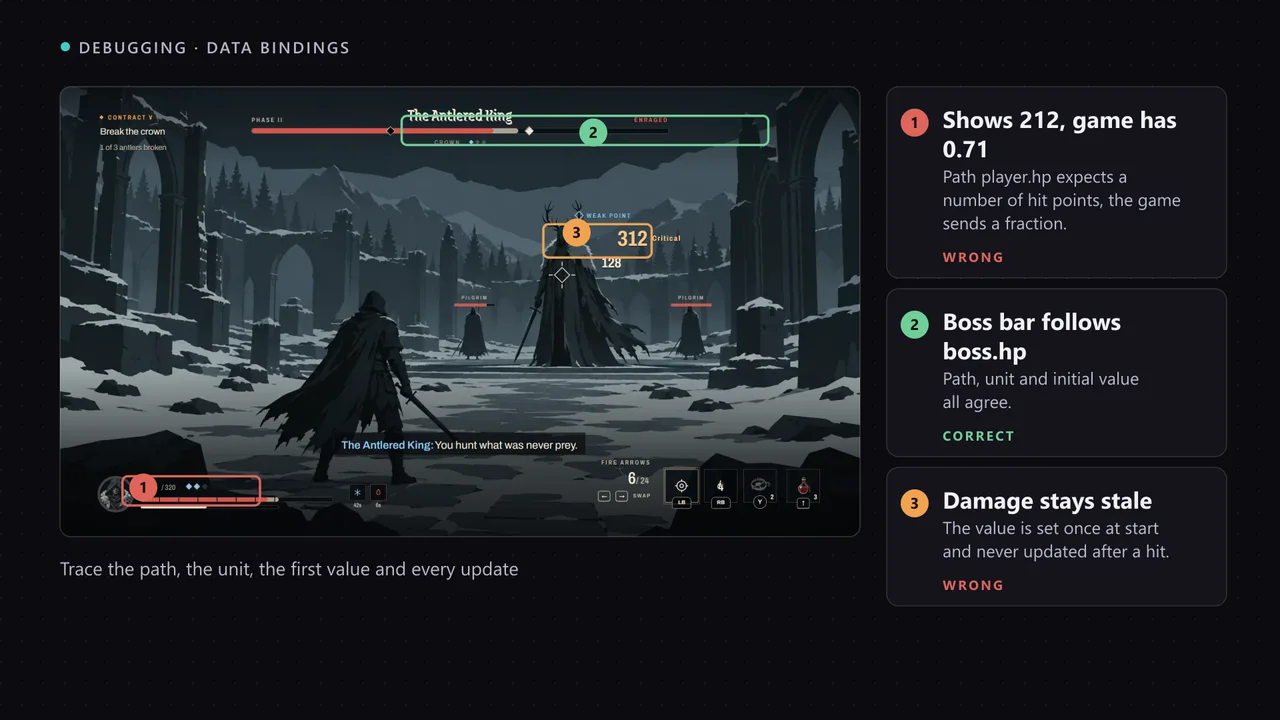
When a health display stays at 100 after the player takes damage, there are several plausible causes. The binding may point to the wrong path, the game may never send an update, or the UI may be reading a different instance from the one the game updates. Changing names at random can hide the real problem.
Trace one value end to end
Write down the expected path through the system:
game health changes -> integration receives the change
-> runtime data at player.hp is updated
-> the intended UI layer reads player.hp
-> the player sees the changed value
Use the actual contract and project names in place of this example. Record the value and time at each boundary. If the game says 48 but the runtime data says 100, investigate the update between those points before editing the UI.
Match the contract to the document
In Envy, Data & events lists paths and the layers that read them. A text template such as {player.hp} / {player.hpMax} needs both paths. If a path is missing, the template can remain visible to make the absence noticeable. Progress bars can bind value and max separately. See bindings.
Check spelling, capitalization, nesting, type and units. A game that sends player.health will not satisfy a binding to player.hp. A value of 0.5 and a value of 50 mean different things if the UI expects hit points. Decide what the screen should display when a value is unavailable.
Ask the agent to reproduce, then isolate
The HUD stays at its initial health value after damage.
Read the project instructions and UI contract. Reproduce the problem
with a small test or recorded sequence. Trace the health source,
the integration call, the runtime data path and the bound layer.
Make the smallest fix supported by the evidence. Run the relevant
checks and report the path, values and any unverified assumptions.
Provide the exact screen, expected behavior and steps to reproduce. If you can, include a known-good and failing state. Ask for evidence before a fix: a guessed rename can break another screen that uses the original path.
Check common failure points
| Symptom | First checks |
|---|---|
| Template text remains visible | Missing path or malformed expression; inspect sample and runtime data |
| Correct value at startup, stale later | Subscription and update call; correct UI instance; screen lifecycle |
| Value changes but bar looks wrong | value and max, range, units and zero maximum |
| Wrong repeated item | Array path, stable item key, item data and selection payload |
| Preview works, game fails | Preview sample differs from game data or game never sends updates |
Envy exposes set_data() for Godot, SetData() for Unity and setData() for the web. Use the relevant runtime documentation for the API and list reference for repeated items. Validation helps find document problems; it cannot prove that the game sent the right value at the right time.
After the fix, rerun the failing sequence and a related case such as a screen reopen or missing value. Keep the evidence with the change so another developer can tell what was verified.
Questions people ask
Why does a UI show a binding expression instead of a value?
In Envy, a missing data path can leave a template visible so the missing value is noticeable. Check the exact path, sample data and the data the game sends.
Why does the UI show the initial value but never update?
The initial data may be set only once, an update may use a different path, or the game event that should trigger the update may not run. Trace each step before changing the binding.
Does validating a UI document prove that the game supplies the right data?
No. Document validation can report problems in the UI, but integration tests must also check the values and timing supplied by the game.