

Game UI localization: text expansion, pseudo-locales and fonts
Translated text runs longer than English, often 20 to 35% for German and similar languages, and much longer on short labels. Give every string a key, size boxes to grow or shrink their text, test early with a pseudo-locale that pads and accents your strings, choose fonts that cover every script you ship, and send translators a CSV with context. Godot, Unity and Envy all support this workflow.
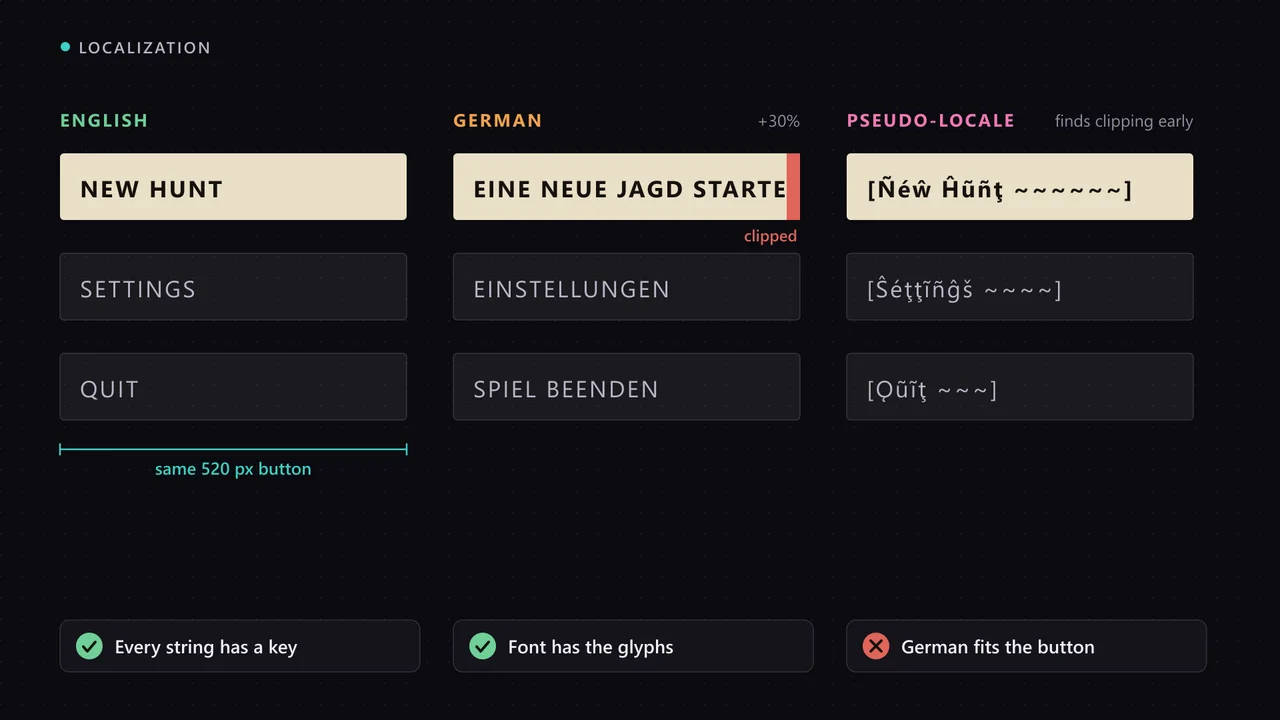
Localization usually starts near the end of a project, when the UI is already “done”. That’s when the German build arrives and half the buttons clip. Most of that pain can be moved to the first week, when fixing it is cheap.
Text gets longer, and short text gets much longer
Translated text is longer than English in most European languages. Localization vendors quote ranges like 20 to 30% for German, and some tools use 10 to 35%. The percentage is worst on short strings, which is exactly what game UI is made of:
| English | German | French |
|---|---|---|
| Play | Spielen | Jouer |
| Settings | Einstellungen | Paramètres |
| Continue | Fortsetzen | Continuer |
| Inventory | Inventar | Inventaire |
| Quit to desktop | Zum Desktop beenden | Quitter vers le bureau |
Chinese, Japanese and Korean go the other way: shorter strings, taller glyphs, and a different line-breaking rule.
Design for it
- Size boxes for the longest translation. Buttons in a menu column should share a width that fits it, or grow with their text.
- Avoid fixed heights on text containers, so a description can wrap to another line.
- Where a box can’t grow, let the text shrink. A tab label or a prompt can scale its font down to a minimum size instead of clipping.
- Leave room on the right of fixed-width HUD groups for longer labels.
Never build sentences from pieces
This is the bug translators can’t fix for you:
# Don't
label.text = tr("You found") + " " + str(count) + " " + tr("coins")
Word order changes between languages, and plural rules differ. Use one string with a placeholder:
# Do
label.text = tr("loot.coins_found").format({"count": count})
# en: "You found {count} coins"
# de: "Du hast {count} Münzen gefunden"
For plurals, Godot supports plural forms in gettext PO files (tr_n()), and Unity’s Localization package supports smart strings with plural rules.
Test with a pseudo-locale on day one
A pseudo-locale is a fake language generated from your own text, something like [Ṕļàààý___] instead of Play. It catches three problems before a translator is involved:
- Text that overflows when it gets longer.
- Strings that are hardcoded and never go through translation (they stay plain English).
- Characters your font can’t draw.
Godot has it built in. Turn on Advanced Settings, then go to Project Settings › Internationalization › Pseudolocalization. Options include an expansion ratio (the Godot docs suggest 0.3), doubled vowels, fake right-to-left, and prefix and suffix markers. You can toggle it at runtime with TranslationServer.pseudolocalization_enabled.
Make the pseudo-locale a menu option in development builds, and play through every screen with it once a week.
Keys, tables and CSV
Give every string a key that says where it lives: menu.play, settings.audio.music, hud.objective.title. Keys outlive wording changes, and the same English word (“Back”, “Open”) can need different translations in different places.
A CSV is still the most common format translators accept:
keys,en,de,fr
menu.play,Play,Spielen,Jouer
menu.settings,Settings,Einstellungen,Paramètres
loot.coins_found,You found {count} coins,Du hast {count} Münzen gefunden,Tu as trouvé {count} pièces
In Godot, import the CSV as a translation, add the result under Project Settings › Localization › Translations, and use the keys as Label text. Controls translate their text by default; auto_translate_mode turns it off for a node, such as a label that shows a player name.
Fonts
- Check glyph coverage for every language you ship: accented Latin, Cyrillic, Greek, Vietnamese, CJK.
- Add font fallbacks for scripts your display font doesn’t cover, and pick ones that sit well next to it.
- Check that the license allows embedding in a game. Many web fonts do; some display fonts don’t.
- Watch the file size. Full CJK fonts are large, and some games ship them per language.
Give translators context
Translators see a spreadsheet, not your game. For each key, add:
- where it appears (a button, a tooltip, a toast),
- a maximum length if there is one,
- what each placeholder holds (
{count}is a number,{name}is a player name), - a screenshot for anything ambiguous.
“Fire” as a verb on a weapon button and “Fire” as a noun in an element list need different words in most languages. Context is how translators know which.
A short checklist
- Every visible string has a key. No text is baked into images.
- Sentences use placeholders, never concatenation.
- The pseudo-locale runs on every screen without clipping.
- Buttons and tabs fit the longest translation, or shrink to fit.
- The font covers every shipped language.
- The language can be changed in game, and the change applies without a restart.
- Translators got context and length limits.
How Envy handles localization
In Envy, a text layer opts in with a key, and the document holds a table per language. The Localization page shows every key in every language side by side, with a Text overflow list measured from the real layout and a Missing translations list. A built-in pseudo-locale shows accented text about 35% longer than the base, on the canvas and in Preview. Export writes a CSV with the key, the source text and a column per language, and Import CSV reads it back. A text can shrink to a minimum size when a translation would overflow, and styled words keep their styling in translations through numbered tags. In Godot, Unity and the browser, the game switches language at runtime. The localization docs have the format.
Questions people ask
How much longer is German than English in game UI?
Localization vendors usually quote 10 to 35% longer for German running text. Short labels expand more in percentage terms: "Settings" becomes "Einstellungen". Plan for long strings on buttons and test with your real translations.
What is pseudo-localization?
A fake language generated from your base text: accented letters, extra padding and brackets around each string. It shows which text overflows, which strings were never made translatable, and which characters your font is missing, before any translator is involved.
How do I localize a Godot game with CSV?
Make a CSV with a keys column and one column per locale code, import it as a translation in the Import dock, add the generated .translation files under Project Settings › Localization › Translations, and use the keys as the text of your Labels and Buttons.
Should I use keys or English text as translation IDs?
Keys, such as menu.play. English text changes during development, and the same English word can need different translations in different places.