

Fix the first five minutes of your vibe-coded game
A new player needs to understand what to do, how to do it and what happened afterward. Test the opening without coaching, then fix the first point of confusion before adding a longer tutorial.
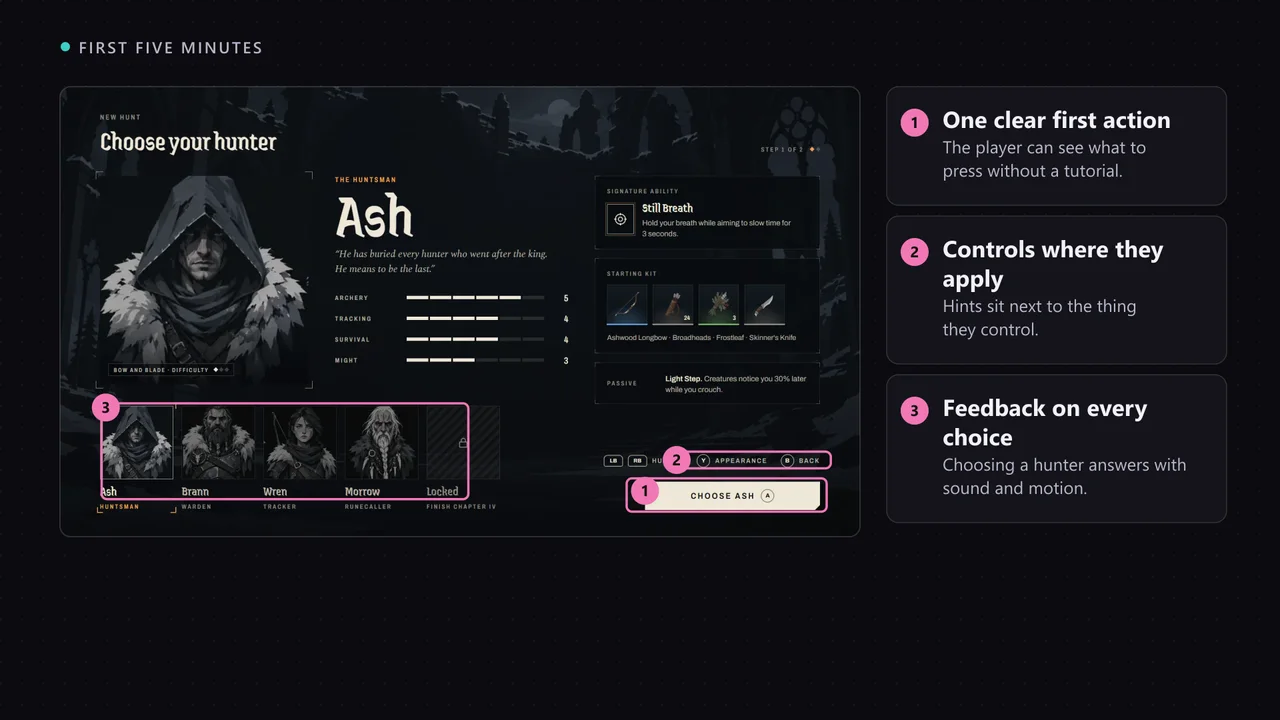
You know that the glowing gate is an exit and that E opens it. A new player does not. If the game never explains either fact, an AI-generated world can feel unfinished even when the code runs.
Improve the opening by watching the first action, not by writing a wall of instructions.
Map the first session
Write the intended path as a sequence:
Open game -> start a run -> move to the gate -> interact
-> see the objective update -> reach the first encounter
This is an example. Use your own game and note the point at which the player needs each piece of information. If the first gate requires a key, the interface should help the player understand both the requirement and whether they have met it.
Teach at the point of use
Place a short instruction where it matters: “Approach the gate” before a distant objective, then “Press E to open” when interaction is available. If the game supports a controller, show the appropriate prompt for the active input when your input system can identify it.
Keep the instruction on screen long enough to read and avoid hiding important action behind an animated banner. If the player cannot perform the action yet, say why. Give them a way to revisit the control information rather than assuming they memorized it on the title screen.
The game owns input detection and the rule for when a prompt appears. In Envy, a text layer can read a data path and a visibility binding can show or hide a layer. See bindings and actions. You still need to connect the game’s state and verify the prompt changes at the right time.
Show the result of the action
When the player opens the gate, the world should respond and the objective should update. If an action fails, show a useful reason. “Requires a key” helps; a button that makes a sound and changes nothing leaves the player guessing.
Use a short delay or transition only when it helps the player follow the change. Do not make them wait for a decorative animation before every retry.
Run an uncoached test
Give a player the build and ask them to start a new game. Do not explain the controls while they play. Note:
- Where they stop or repeat an action.
- What they say they expected.
- Which information was on screen at that moment.
- Whether they can recover without your help.
One playtest is useful evidence for a problem; it does not prove that every player will have the same experience. Make a change, then ask someone else or rerun the opening from a fresh state.
Give an agent a specific change
In a new game, the player reaches the gate without knowing how to open it.
Add a short interaction prompt only while the gate can be used.
Use the existing input and objective systems. Show the correct label
for the supported input method, and remove the prompt after success.
Do not change the gate rules. Report what you tested.
Replace the example with your actual interaction and supported devices. If input detection is not already present, have the agent identify that gap instead of inventing a working integration.
Questions people ask
Does every game need a tutorial?
No. Some games can teach their first action through a clear environment, a short prompt or an optional help screen. Test the opening with the audience you expect.
What should a first-time player see first?
Give the player a clear next action and any control information needed to perform it. The right presentation depends on the game.
Can AI decide whether my tutorial is clear?
An agent can identify missing instructions or compare a flow with your brief. Observing someone unfamiliar with the game is stronger evidence of what players actually understand.