

Turn a game HUD screenshot into an AI-ready brief
A HUD screenshot captures one arrangement at one moment. Pair it with the underlying data, important states, target viewports and behavior rules before asking an AI agent to build or integrate it.
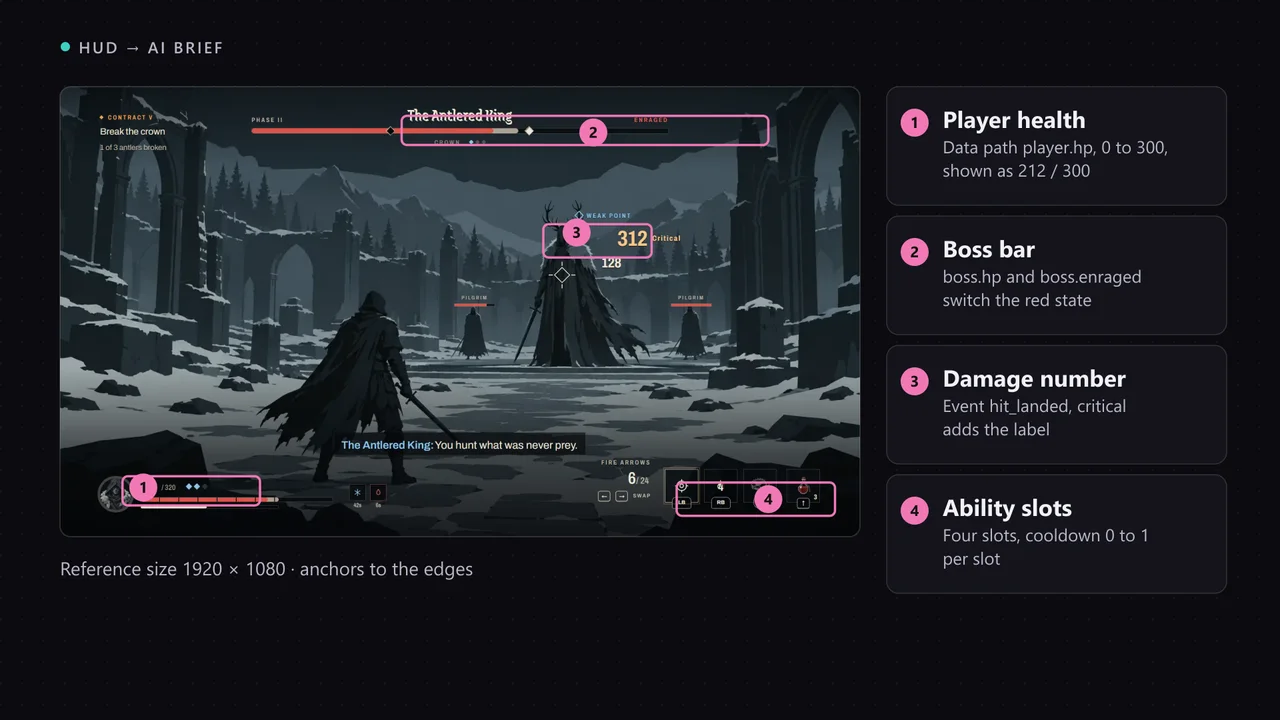
A screenshot can show the location of a health bar and the shape of its frame. It cannot tell an agent whether the bar represents current health or a percentage, whether a boss name can wrap, or when the entire panel should disappear.
Start with the screenshot as a visual reference. Add the missing behavior as a short, testable brief.
Annotate what is visible
Name the main regions and their purpose. For example: player health in the lower left, current objective at the top, and boss health while an encounter is active. Record the reference resolution and the intended safe area. Note which parts must stay legible when the game world is bright or busy.
The accompanying image shows a scene from The Last Hunt, a fictional game UI example. Treat its health values, names and encounter details as sample data, not measurements from a released game.
Describe what changes
| State | Data or rule to supply | What to review |
|---|---|---|
| Normal play | Current and maximum player health | Value and bar stay in sync |
| Low health | A low value and the intended warning | Warning does not obscure essential information |
| No boss | Whether the encounter panel should be hidden | No empty panel remains unless designed |
| Long label | A representative long localized name | Text fits or follows the agreed overflow rule |
| Small display | Target viewport and scale | Essential information remains readable |
For each value, state its unit and source. If player.hp is a number of hit points, provide player.hpMax too. Decide what to show before either value is available and what should happen when a maximum is zero.
Build the design and contract
In Envy, draw the HUD and bind its layers to the paths agreed with the game. A progress bar can use separate value and max bindings. Sample data and scenarios let you preview different states before the game supplies real values. See data and scenarios.
The agent needs the document and its contract, not only the reference image. Export the AI handoff, include renders if visual comparison is part of the review, and ask the agent to connect the existing player and encounter systems. Its job is to map the contract to actual game state; the game still owns the rules.
Compare the right things
For a visual comparison, use the same viewport, scale and sample values on both sides. Check text, margins, clipping and contrast against representative gameplay. Then run the target engine and change the real values. Confirm that updates arrive at the expected time and that the boss panel appears and disappears under the agreed conditions.
The runtime differences describe places where fonts, clipping and effects can vary between Envy’s runtimes. A similar screenshot is useful evidence of appearance. It does not establish that data or gameplay events work.
Questions people ask
Is a HUD screenshot enough for an AI agent to implement the interface?
No. It shows appearance at one point in time, but does not define values, behavior, safe areas, input or how the layout changes with the viewport.
What HUD states should I include in a brief?
Choose states that change the design, such as full and low health, a missing target, long names and an encounter with several active indicators.
How should I compare a generated HUD with the reference?
Use the same viewport, scale and sample data for the visual comparison, then separately test live game updates and the target devices.