

AI-assisted game UI localization without broken layouts
Use AI to prepare a glossary, flag ambiguous strings and suggest test cases. Keep translation keys and placeholders intact, test expanded text and glyph coverage in the real UI, and have a qualified reviewer approve player-facing translations.
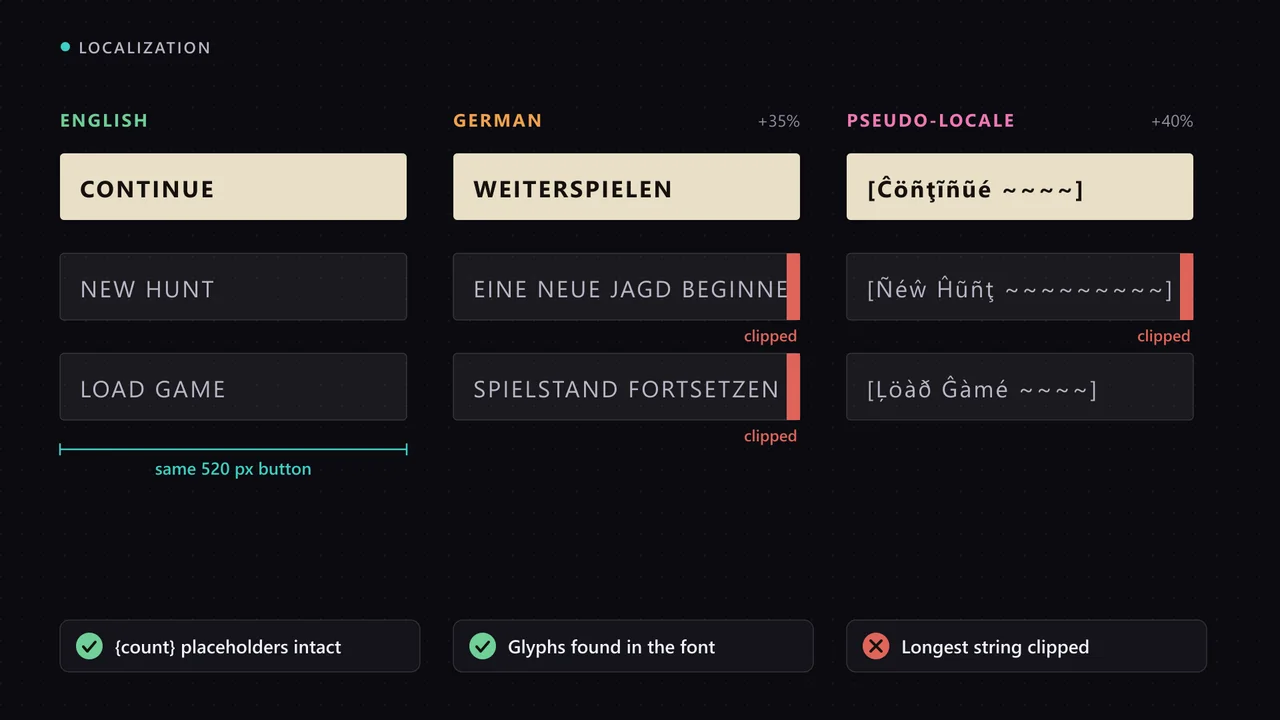
“Continue” can mean resume a game or move to the next line of dialogue. An AI translator given only a spreadsheet cell has to guess. A good localization workflow supplies context, protects the parts that code needs, and tests the result on the screen players will see.
Give every string a job and a context
Create a stable key for each player-facing message. Include the screen, meaning, a screenshot or reference and any length constraint that has a real design reason. Record who owns approval of terminology. This example is illustrative:
| Key | Source text | Context | Constraint |
|---|---|---|---|
pause.resume |
Resume | Button that returns to active play | Must fit the button at the smallest supported size |
save.delete.confirm |
Delete this save? | Confirmation before an irreversible action | Keep the question clear; do not shorten away the consequence |
hud.health |
Health: {value} | Current player health | Preserve {value} exactly |
Avoid asking a model to infer limits from English character counts. A short English label can need more room in another language, and character widths vary by font. Set layout constraints in pixels or responsive behavior where useful, then test real strings.
Protect placeholders and markup
Before translation, list tokens that must survive unchanged: {value}, formatting tags, control glyph markers and any engine-specific variables. Compare the source and translation token sets automatically. A missing token can break a sentence; an extra one can cause an error or display raw syntax.
For plural forms, dates and numbers, use the localization facilities your game actually supports. Do not ask an agent to invent a universal plural rule. The Godot internationalization documentation describes engine support and context to consider.
Tell the model what should not be translated, such as an internal event name or a protected proper noun. Give it a glossary and a description of the speaker. Treat its output as a draft, and avoid putting confidential narrative or personal data into a service unless your team has approved that use.
Run a pseudolocalization pass
Pseudolocalization changes visible source strings in a recognizable way, often making them longer and adding accented characters. The goal is to expose text that does not go through the localization system, labels with insufficient space and some font problems. It is not a substitute for testing an actual language, right-to-left layout or a native speaker’s review.
Test a representative set of screens:
- The smallest supported window or handheld profile.
- Buttons with short English labels, such as Play and Back.
- Dialogues, tooltips and error messages with longer text.
- Empty and full inventory states, including item names.
- Dynamic values and placeholders at their expected extremes.
Record the screen, language or test transform, font, viewport and data sample for each failure. A screenshot without that context is difficult to reproduce.
Check rendering and input in the target engine
Verify that the shipped font covers the characters you need and that the license permits your intended distribution. Test fallback behavior too. Confirm that line breaks and truncation do not conceal a destructive action or its consequence.
Check controller and keyboard navigation after layout changes. If a translated label grows, a focus indicator or neighboring control may be obscured. Test supported right-to-left languages with actual text and the target engine’s layout and shaping behavior; reversing characters by hand is not a complete solution.
Use Envy for the handoff, then review the game
Envy supports localization tables, sample data and scenarios. Its MCP server can set a translation for a language, while document validation checks the document. The base locale’s text remains in its layers. See the localization guide for the actual workflow.
In Envy’s Localization page, assign keys, export a CSV with the source and language columns, and give translators the context they need. Select Pseudo to inspect expanded text, then use Text overflow and Missing translations to make a review list. Import reviewed translations and inspect them on the target screens. Missing translations fall back to the base text, so check the missing-translation report rather than assuming every visible string was translated.
An agent can flag missing keys and prepare a review list. A person should approve the translation, and the team should inspect the resulting screens in the target engine. The game UI localization guide covers the broader setup and testing decisions.
Questions people ask
Can AI translate a game UI by itself?
AI can draft translations and surface questions, but a fluent reviewer should check meaning, tone, cultural context and terminology. The team still needs to test the translated UI in the game.
What is pseudolocalization?
It is a test transformation that makes source text longer or visually distinctive to expose hard-coded text, clipping and some character-handling problems before finished translations arrive.
Should an AI translator change placeholders?
No. Preserve the placeholders and syntax required by the game. Validate them automatically where possible and check the resulting text in context.