

Gamepad and keyboard navigation for Godot menus
Godot 4 moves UI focus with the ui_up, ui_down, ui_left, ui_right, ui_focus_next and ui_focus_prev actions, but only after a control has focus. Call grab_focus.call_deferred() on a real button whenever a menu opens, set focus_mode to All on buttons only, set focus neighbors where the automatic guess goes wrong, and give buttons a visible focus style.
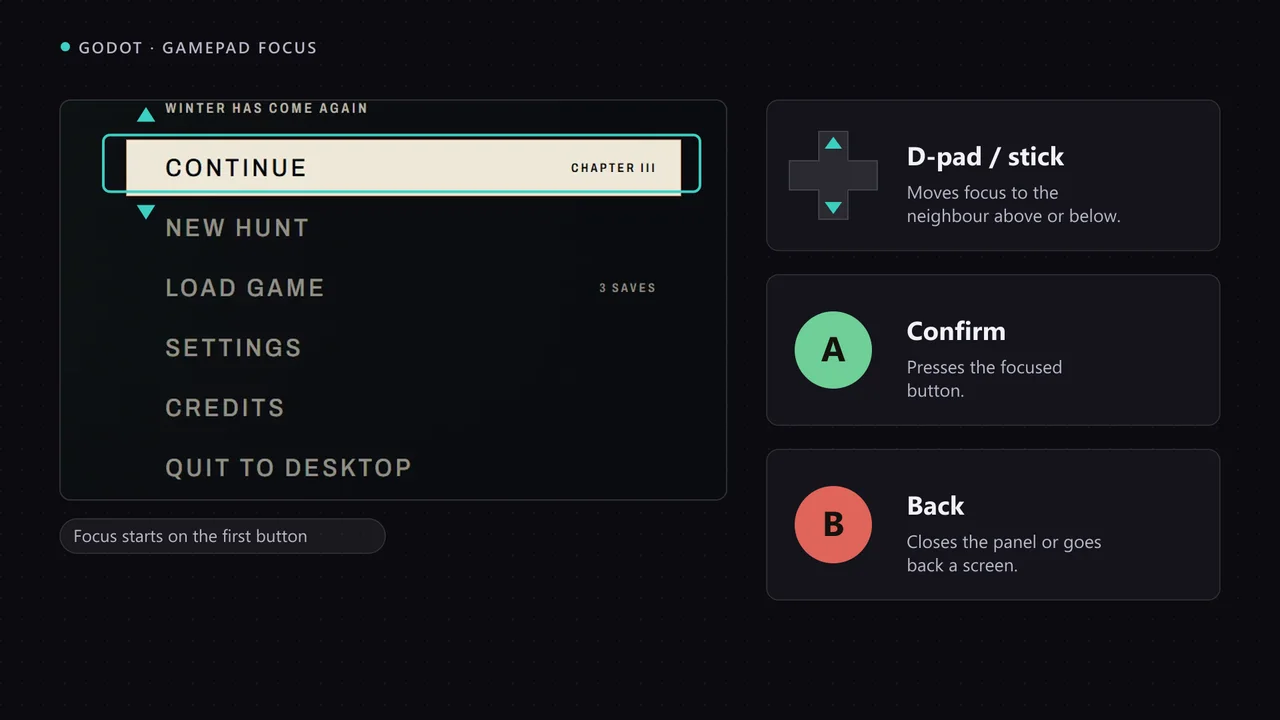
A Godot menu that only works with a mouse is a common reason for a bad first impression on Steam Deck and on TV setups. The engine has everything you need for gamepad and keyboard navigation built in. The trouble is that it does nothing until you give it a starting point, and the automatic guesses get worse as menus get more complex.
How Godot moves focus
Every Control can hold focus. The player moves it with input actions from the Input Map:
| Action | Default keys and buttons | Moves focus |
|---|---|---|
ui_up, ui_down, ui_left, ui_right |
Arrow keys, d-pad, left stick | To the neighbor in that direction |
ui_focus_next, ui_focus_prev |
Tab, Shift Tab | To the next or previous control |
ui_accept |
Enter, Space, gamepad A | Presses the focused button |
ui_cancel |
Escape, gamepad B | Closes popups. Your own panels need code |
The Godot UI navigation docs warn against using these actions for gameplay, because UI focus listens to them too. Give your game its own actions, even if they’re bound to the same keys.
When a control has no neighbor set for a direction, Godot guesses by position. In a single column of buttons the guess is fine. In a settings screen with tabs, sliders and a scroll container, it starts to skip things.
The four settings that matter
1. focus_mode
focus_mode has three values: All (mouse and keyboard or gamepad), Click (mouse only) and None. Buttons default to All and Labels to None. Containers and decorative panels should stay at None, or the d-pad will land on invisible rectangles.
2. Initial focus
func open() -> void:
	show()
	%FirstButton.grab_focus.call_deferred()
Call this every time a menu or panel opens, not only in _ready(). A node that becomes hidden loses focus, so a closed submenu can leave focus nowhere.
3. Neighbors
In the Inspector, under Control › Focus, set Neighbor Left/Top/Right/Bottom and Next/Previous to node paths. In code they’re focus_neighbor_left, focus_neighbor_top, focus_neighbor_right, focus_neighbor_bottom, focus_next and focus_previous.
Set them where the guess is wrong:
- Wrapping from the last item back to the first.
- Moving from a tab bar into the tab’s content, and back up.
- Skipping a disabled button.
- Grids where “down” from the last column should go to a button below the grid.
4. A visible focus style
Give Button a focus StyleBox in your Theme. A 2 px outline in your accent color is enough. Players need to see the selection from the couch, and a style that only changes a subtle shade disappears on a TV.
Returning focus after a submenu closes
When Settings closes, focus should go back to the Settings button, not to the top of the menu. Store the owner before opening:
var _return_to: Control

func open_submenu(panel: Control, first: Control) -> void:
	_return_to = get_viewport().gui_get_focus_owner()
	panel.show()
	first.grab_focus.call_deferred()

func close_submenu(panel: Control) -> void:
	panel.hide()
	if is_instance_valid(_return_to):
		_return_to.grab_focus.call_deferred()

func _unhandled_input(event: InputEvent) -> void:
	if %SettingsPanel.visible and event.is_action_pressed("ui_cancel"):
		close_submenu(%SettingsPanel)
		get_viewport().set_input_as_handled()
Mouse and gamepad together
Players switch. A common pattern:
- When the mouse moves over the menu, let hover show the selection and stop drawing the focus ring.
- When a d-pad or key press arrives and nothing has focus, focus the button under the last hover, or the first button.
Godot’s focus_entered and mouse_entered signals are enough to build this. Many games also make hover move focus (grab_focus() on mouse_entered), so there is only ever one selected button.
Sliders, dropdowns and text fields
Left and right on a focused HSlider change its value instead of moving focus. That is usually right, but it means a slider in a horizontal row traps focus. Put sliders in vertical lists.
OptionButton opens a popup that takes focus. Test that Back closes the popup first, then the panel.
LineEdit takes the keyboard while it’s being edited. On Steam Deck a text field also needs the on-screen keyboard. Valve’s requirements say text entry must open it through Steamworks, or offer controller-only entry in the game.
A checklist before you ship
- Unplug the mouse and play from the title screen to the first level and back.
- Open and close every submenu with A and B only.
- Check that no button is unreachable and none is a dead end.
- Check focus after a scene change, after a popup and after an alt-tab.
- Try a stick, not only the d-pad. If one flick skips two buttons, raise the action’s deadzone in the Input Map.
How Envy handles focus
In Envy, every button can take keyboard and gamepad focus in all three runtimes. With nothing set, arrows and the d-pad go to the nearest button by position. You mark one button per screen as the first focus, mark an overlay’s Back button so Escape and gamepad B press it, and turn on a focus ring with its own color and width. Flows › Gamepad focus shows each screen with numbered buttons in focus order, and you can drag the order around and press Preview to try it with a real controller. Closing an overlay returns focus to the button that opened it. The focus docs cover the details, and the main menu tutorial shows the same ideas in plain Godot.
Questions people ask
Why doesn't my Godot UI respond to a gamepad?
Usually because nothing has focus. Godot moves focus between controls, so with no focused control the d-pad has nothing to move. Call grab_focus.call_deferred() on the first button when the menu becomes visible.
Why does grab_focus() not work in _ready()?
The node may not be visible or inside the tree yet when _ready() runs on a parent. Defer it with grab_focus.call_deferred(), and call it again from the code that shows the menu.
How do I stop the analog stick skipping several buttons?
Raise the deadzone of the ui_up, ui_down, ui_left and ui_right actions in the Input Map, or remove the stick from those actions and keep the d-pad. Some games also add a short repeat delay in code.
Does Steam Deck Verified require controller navigation?
Yes. Valve requires that the default controller configuration reaches all content, including launchers and menus, without changing settings first.