

Build a Godot inventory UI with an AI coding agent
A usable inventory needs a list of items from the game, a repeatable slot design and a way to send the selected item ID back. Give an AI agent those interfaces and sample states, then verify selection, updates and controller focus in Godot.
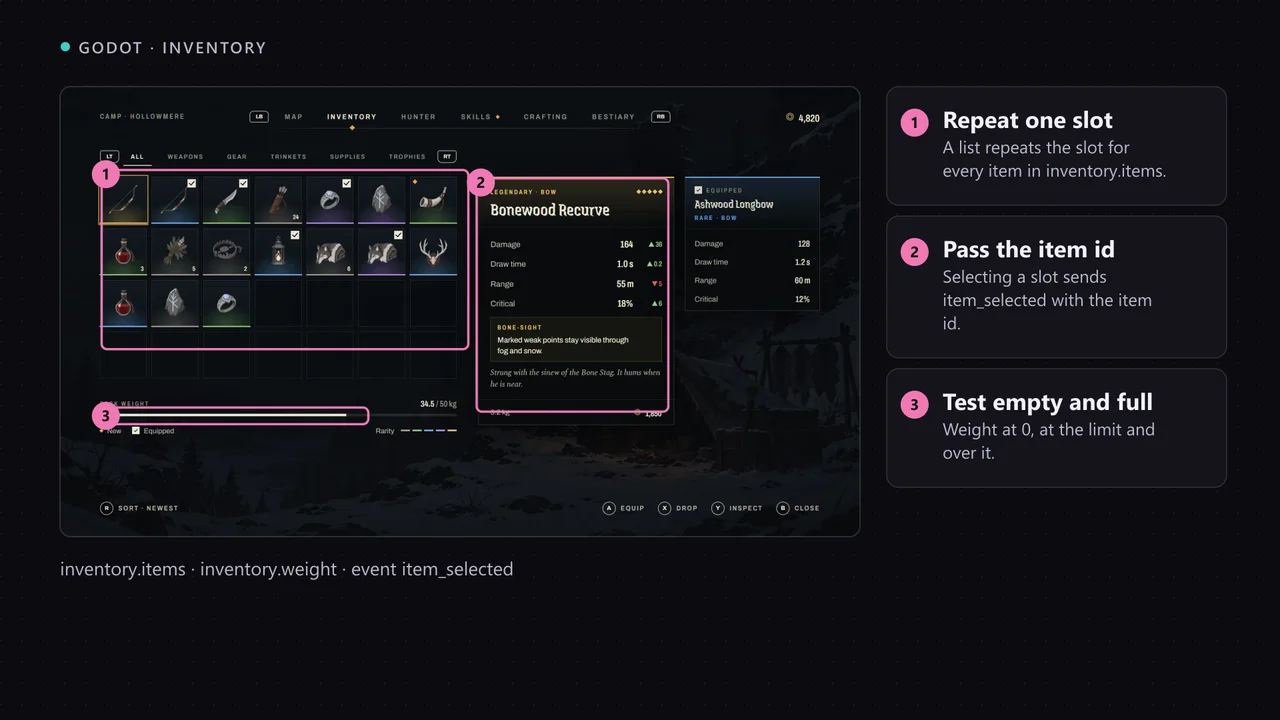
Start with one action: the player selects an inventory item and the game receives its identifier. Once that works, add equipment rules, filtering or drag and drop as separate requirements. This keeps the first integration small enough to inspect.
Define the inventory data
Use a stable ID for each item, not its position in the list. Positions change when the player sorts or filters the inventory. Here is illustrative sample data, not a built-in Envy inventory format:
{
  "inventory": {
    "items": [
      { "id": "potion_17", "name": "Health potion", "quantity": 2 },
      { "id": "bow_04", "name": "Hunter bow", "quantity": 1 }
    ]
  }
}
Agree on what an ID identifies. If several identical potions share one stack, the ID should identify that stack. If equipment instances can have different durability, each needs the identity your game uses to distinguish it. The game owns the inventory, including capacity and item validity.
Draw and repeat one slot
In Envy, make a frame for the inventory and a child that represents one slot. Under the frame’s Repeat section, set Data to inventory.items, choose the child as Item and use id as the key. Bind the name and quantity inside that template to item.name and item.quantity.
If the UI has a fixed number of slots, Fill to and an Empty child can show the unused positions. The list documentation explains the frame, template and key fields. Give the repeated button an emit action with a payload of {item.id}. For this example, call the event inventory_item_selected.
Set sample data before handing off the screen. Preview zero, one and many items, as well as a long item name. A slot that looks good with two short labels can fail when the inventory is full.
Ask the agent to wire the game boundary
Export the AI handoff package and inspect its contract.json for the actual paths and events. Then give the agent the package, your Godot project instructions and a bounded task:
Load the supplied inventory UI with the Envy Godot runtime.
Publish the current inventory as inventory.items and update it after
the inventory changes. Handle inventory_item_selected by passing
the payload to the existing inventory system. Keep item validation
in that system. Test empty, full, reordered and invalid-ID cases.
Report any integration you could not run or verify.
The event and path above are examples. Replace them if your contract uses different names. Envy’s Godot runtime uses set_data() and emits the ui_event signal; see the Godot runtime guide. The agent still needs to find the game’s real inventory source and update it at the correct time.
Test what the player can do
- Open an empty inventory. Confirm that empty slots or the chosen empty message appear.
- Add two items, select the second and check that the game receives its ID.
- Reorder the items and select the same item again. The ID should remain the same.
- Remove or invalidate an item before the action is processed. The game should reject it safely and refresh the UI.
- Test keyboard or gamepad focus, long names and the actual target resolution.
If your design calls for drag and drop, write acceptance checks for the source, target, cancellation and invalid drop. A repeated slot layout alone does not implement those rules. If you want to build the inventory data layer and GridContainer slots from scratch in GDScript, see our Godot 4 inventory system guide; otherwise see Envy for coding agents for the handoff workflow and its limits.
Questions people ask
Can an AI agent build a Godot inventory from a screenshot?
A screenshot can guide appearance, but it does not define item identifiers, game rules, empty slots or selection behavior. Provide the data contract and test the result in the running game.
Who decides whether an item can be equipped?
The game inventory system should validate the action. The UI can show availability and send the selected item ID, but it should not be the only place enforcing game rules.
Does a repeated inventory automatically support drag and drop?
A repeated list creates slots from data. Drag and drop is a separate interaction that needs its own implementation and testing.