

Fix shop feedback in your vibe-coded game
A good shop shows the item and price, explains when a purchase is unavailable, and updates only after the game confirms the result. The UI requests the action; the game validates the transaction and owns the inventory and balance.
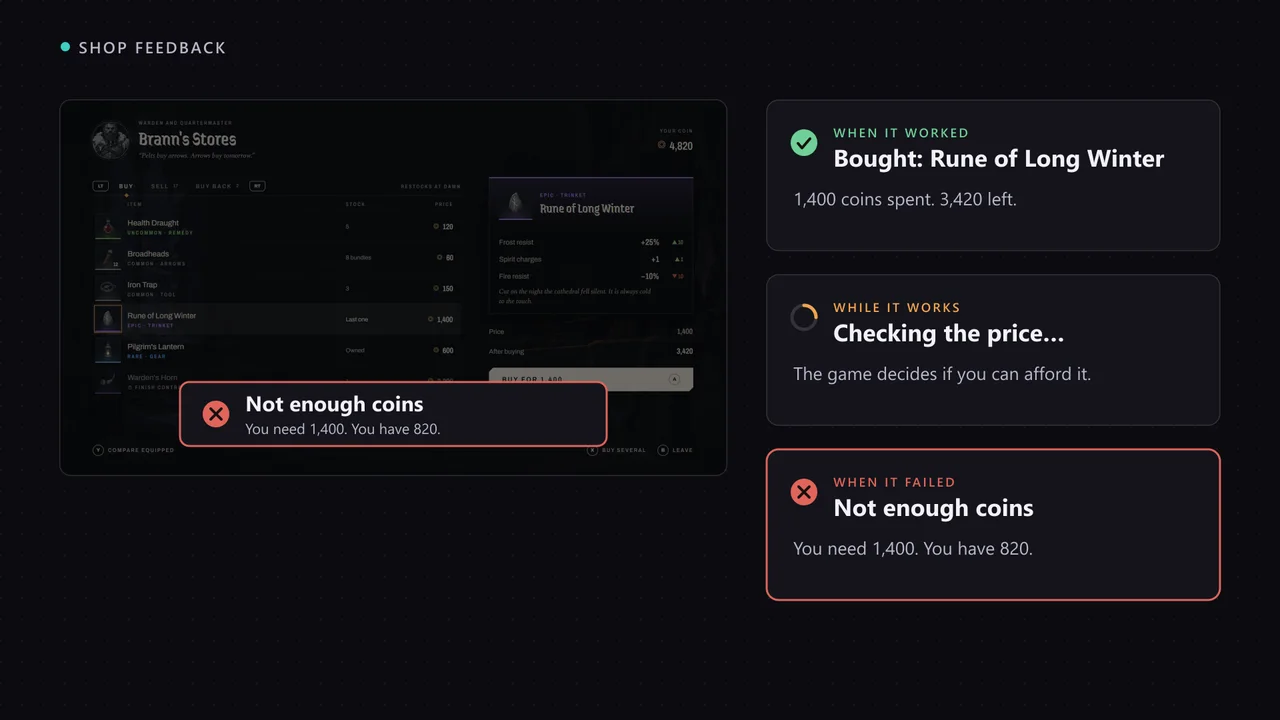
The player presses Buy. A sound plays, the balance stays the same and nothing appears in the inventory. The screen acknowledged the click, but it never explained what happened.
Trace one purchase from the selected item to the result before restyling the whole shop.
Make the decision visible
Each item needs a name, a price and enough information for the player to decide. Show the current balance near the purchase action. If an item is unavailable, explain the reason in plain language: “Requires 50 coins” is more useful than a gray button with no explanation.
Check long names, zero currency and a full inventory. Decide how the shop should look while it has no items or while item data is still loading. These are design choices for your game, not assumptions the agent should invent.
Agree on one purchase path
The example below uses illustrative names:
| Step | Owner | Result |
|---|---|---|
| Display item | Game supplies data; UI displays it | Name, ID, price and availability are visible |
| Request purchase | UI sends buy with item ID |
Game receives the intended item |
| Validate | Game checks current rules | Accept or reject with a reason |
| Update | Game changes its state after acceptance | Balance and inventory reflect the transaction |
| Respond | Game supplies the result; UI displays it | Player sees success or a useful failure |
For a server-authoritative game, the server must validate its own transactions. A disabled button is only a visual and input cue; it cannot be the sole enforcement of balance or item ownership.
Build the list and states
Envy’s repeaters can draw one item template for an array. A stable item ID can be sent as an event payload such as {item.id}. The game supplies the list and handles the event.
Use a visible message for a rejected action. If the operation can take time, show a pending state and decide whether repeated presses should be ignored. The game needs to enforce that behavior too. Use sample data and scenarios to inspect an empty shop, an unaffordable item and a successful result before connecting the real systems.
Test a transaction, not a click
Start with a known balance and a known item. Buy it once, verify the new balance and inventory, then reopen the shop and check that the state remains correct. Repeat with insufficient currency, an unavailable item and two rapid presses. If your game saves purchases, restart and test persistence as well.
For an online shop, also test the failure and retry behavior you support. Do not display success merely because a request was sent.
Ask an agent to fix the observed failure
In the current build, buying the healing item plays a press sound
but the balance and inventory do not change. Trace the event payload,
purchase validation and result data. Preserve the existing economy.
Report the cause, the files changed and which success, failure and
repeat-input cases you actually tested.
The merchant image above is from The Last Hunt, a fictional game UI. Your item’s price, purchase rules and error messages must come from your own project.
Questions people ask
Should a game shop button check the balance?
The UI can use the balance to explain or disable an unavailable action, but the game must still validate the purchase when it receives the request.
When should the UI show a successful purchase?
Show success after the game confirms the transaction. If it fails, explain the reason and keep the displayed balance and inventory consistent with the game.
Does a repeated item list implement a shop?
A repeated list can display items and send their identifiers. Prices, availability, transaction rules and persistence remain game responsibilities.